
Business text messaging. All in one place.
Keep customers informed and conversations moving. MintTXT gives New Zealand businesses one shared workspace to send SMS, manage replies and organise the messages that keep the day running.
Customers miss calls. They read texts. MintTXT lets you send appointment reminders, job updates and group messages from a browser, from $0.15 a message, with every reply landing where your whole team can see it.
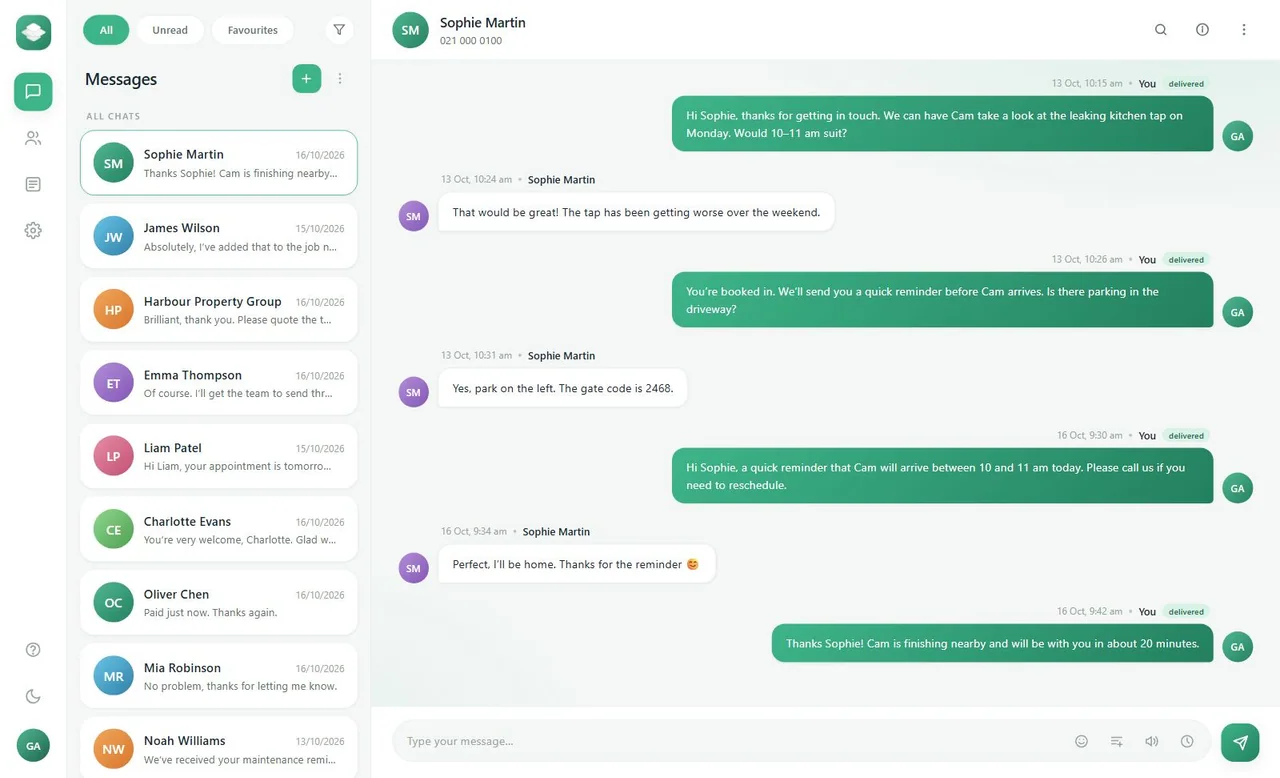
- Two-way SMSreplies come straight back to you
- Group TXTone send, and everyone gets their own text
- KeywordsFree dedicated keywords for each Mint customer
- $0 monthlyPay per message. No surprises.
Less chasing. More useful conversations.
A quick text can answer a question, confirm a time or keep a customer in the loop. But when those texts live on personal phones, they're hard to find and easy to lose. MintTXT keeps every conversation in one place your whole team can see.
Send the update. Keep the reply.
Customers can reply to your messages, and the conversation carries on right inside MintTXT. Need to check what was said last week? It's all there. Pick up the context and keep things moving.
Reach a group without starting a group chat.
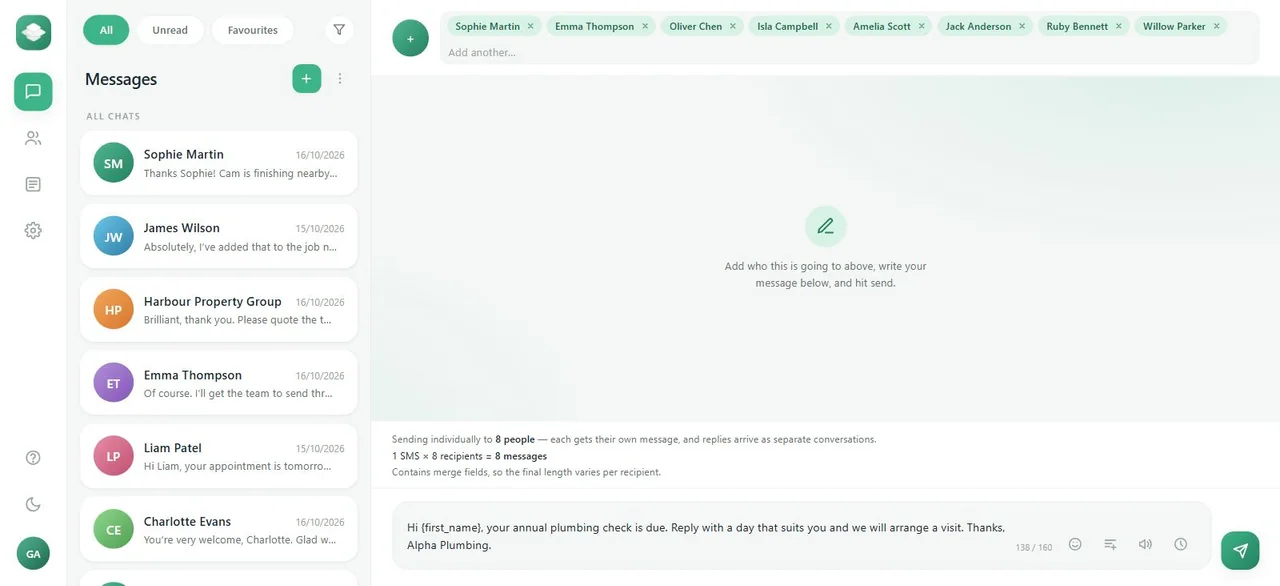
Send one update to several contacts at once. Each person gets their own message, so nobody's stuck in a noisy group thread. Replies come back as separate conversations that are easy to follow and answer.
Make repeat messages take less work.
Typing the same text over and over? Not anymore. Save templates for reminders, arrivals and follow-ups, then add contact details like a first name so each message feels personal. Give it a quick check, and it's ready to send.
Get tomorrow's messages ready today.
Mornings get busy fast. Write your messages ahead of time and schedule them to go out when you choose. Your updates are sorted before the day starts, and nobody has to remember to hit send.
One template. Individual messages.
Typing the same numbers in over and over? Not anymore. Sort your contacts into groups for the people you message most, like maintenance customers or event attendees. Already keep them in a spreadsheet? Import it, then check and tidy your contacts in MintTXT.
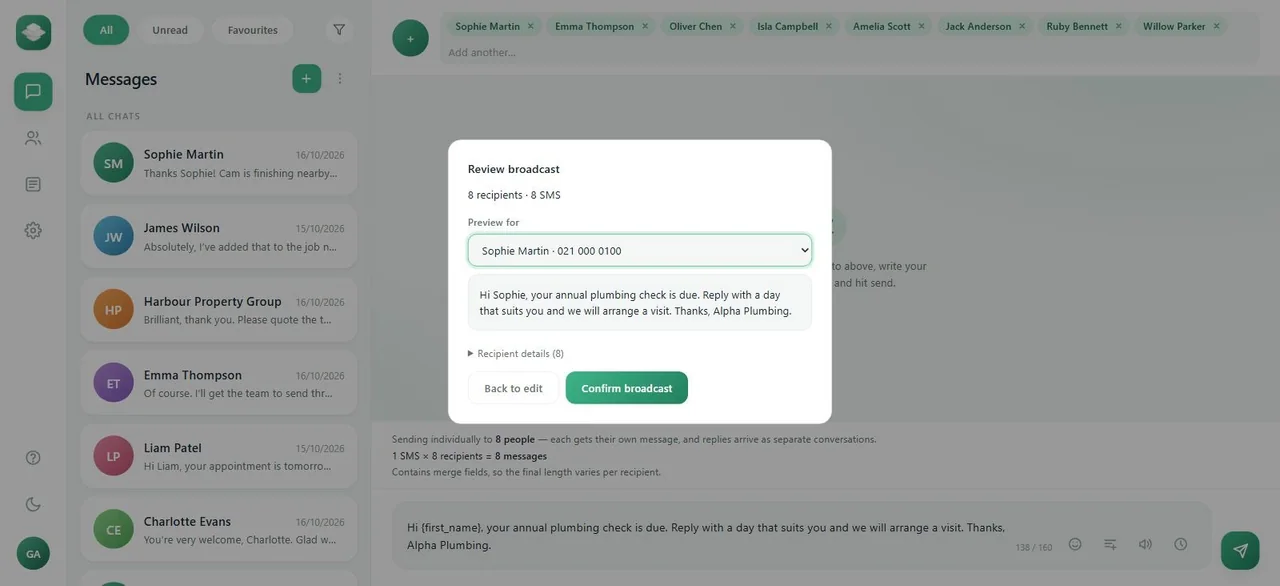
Pick a saved template for regular updates and add fields like a first name. Each person gets their own message, not a spot in a group chat. You'll also see exactly what they'll receive before you confirm.
Check it before it goes.
Worried about sending the wrong thing to the whole list? You don't have to be. Before a broadcast goes out, MintTXT shows you how many people it's going to. Pick any one of them and preview their exact message, with their name and details already filled in.
Happy with it? Send it now or schedule it for later. MintTXT handles the sending in the background, so you can get on with your day. You can check how each message went in your workspace.
A broadcast starts separate conversations, not one shared group chat. So when someone replies with a question or a change of plan, your team can answer them directly.
Fits the way your business works
Appointments and bookings
Remind customers when to expect you, and give them an easy way to reply if plans change. Their reply comes back to MintTXT, so your team can pick up the conversation from there.
Trades and service teams
Send arrival updates, sort out access questions and follow up after the job. No personal phones needed.
Events and group updates
Keep everyone in the loop on times, arrangements and last-minute changes. Each person gets their own TXT, not a spot in a noisy group chat.
Connected business systems
Already have a way of working you like? Use email to SMS, the API or webhooks to make txting part of it.
From your first message to your next conversation
Find the right people fast
Pick a saved contact, type in a number or pull up a whole group. No digging through phones or spreadsheets to get started.
Send something worth reading
Write it from scratch or use a saved template. Add a first name or other details to make it feel personal, then send it now or set it to go out later.
Stay on top of every reply
See exactly how each message landed and handle replies from one shared workspace. Nothing slips, and your whole team stays in the loop.
More ways to send and receive
Not every message starts in the app. Here are a few other ways to get texts moving.
A keyword of your own
Want customers to text you first? Every customer gets a free keyword on our shortcodes, so people can text in to start an enquiry. You pick the keyword, and it's yours, absolutely free.
Email to SMS
Spend most of your day in your inbox? Once an administrator turns it on for you, email the recipient's number at send.txt.net.nz from your authorised address. The plain-text body goes out as the text.
Voice messages
Some messages land better as a call. For selected accounts, MintTXT can turn a written message into a phone call. Pick from a choice of voices and select your outbound number. Not sure it's right for you? Just ask us.
Connect your software. Keep control of sending.
Bring messaging into your own systems with the MintTXT API and webhooks. Whether you want to send from your AI assistant or from your job booking software, we've got you covered.
REST API
Want texts to go out from software you already use? The API lets your systems submit messages, retrieve messages and statuses, and manage contacts, groups and broadcasts.
Webhooks
Replies shouldn't sit in one place while your other systems wait. Webhooks send replies, message status changes and consent commands straight to your own systems.
Claude, ChatGPT and other assistants
Already using an AI assistant? A compatible one can find contacts, read recent messages, check statuses and prepare and send TXT messages.
Which connection fits your workflow?
MintTXT is built to work the way you work. Whether you're sending from ChatGPT, your CRM or just from the browser, we've got a way for you to connect.
| Your workflow | Connection to explore |
|---|---|
| Send and manage messages from any web browser | MintTXT web version |
| Send a quick text from an enabled email account | Email to SMS |
| Submit messages from your own application | REST API |
| Receive replies and status updates in another system | Webhooks |
| Find information and prepare a message with an assistant | Assistant/MCP connection |
Simple, monthly billing
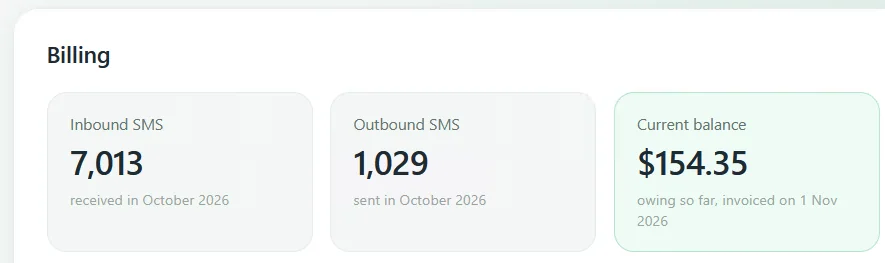
Messages start from $0.15 each. No surprises. That's it. We charge $0.15 per 160 characters, whether you're sending a TXT message, a voice message or a group message/broadcast to multiple people.
No monthly fees, no hidden fees, just $0.15 per SMS, billed at the end of each month. It's that simple.
Related services
Business SMS FAQs
What is business SMS?
Business SMS is a way for your team to send and manage text messages from one shared workspace instead of individual phones. With MintTXT, you can write messages, manage contacts, schedule updates and handle replies, all from your browser, your email inbox, your existing business software or your AI agent.
Need access for your team? Add as many users as you need.
Can customers reply to our texts?
Yes. MintTXT supports two-way messaging, so every reply gets routed straight back into your workspace. You'll see responses alongside the original message, not scattered across different phones or inboxes.
That means whoever's managing your texts can follow a conversation properly, instead of chasing replies that landed on someone else's device.
Can we send one message to several people?
Yes, with a broadcast. Each recipient gets their own individual message. Replies stay separate too, so you're not stuck untangling a reply-all chain.
You can also personalise each message using supported contact fields, like a first name or account number. You send it as a group, but it still feels like a message meant for them.
Can we schedule text messages?
Yes. You can set a message to send at a specific date and time, so reminders and updates go out automatically without anyone needing to hit send manually.
Changed your mind? You can cancel a scheduled message, as long as it hasn't already started processing. Once it's too far along, it'll go out as planned.
Can we send texts to Australian numbers?
Yes. Australian numbers are supported for outbound sending and inbound replies, so texting your Sydney or Melbourne contacts works the same way as texting locally.
Other international destinations are best-effort. We'll do what we can to get the message there, but due to the way SMS works, delivery isn't guaranteed the way it is for New Zealand and Australian numbers.
How is SMS charged?
Messages are $0.15 + GST each, charged by segment (160 characters). A longer message that splits into two segments costs for two, so keeping it tight keeps it cheaper.
Billing runs monthly. Inbound messages are charged if you choose a free to text option for your customers, with the same $0.15 + GST per TXT you receive.
Does 'delivered' mean someone read the message?
No. A 'delivered' status confirms the message reached the recipient's phone. It's not a read receipt, so it won't tell you whether they actually opened or read it.
If you need proof your message landed, delivered status is a solid signal. Just don't mistake it for engagement.
Do we get our own keyword?
Yes. Every MintTXT customer gets a free keyword on the shortcode, something customers can text in to trigger a response or join a list.
You'll request your keyword from within MintTXT, and our team reviews it before it goes live. This keeps keywords sensible and avoids clashes with other businesses on the same shortcode.
Can we send from our email?
Yes, if your administrator has switched it on for your account. Once enabled, you can send a text by emailing the recipient's number at send.txt.net.nz from your authorised email address.
The plain-text body of your email becomes the message, so there's no new tool to learn. Just write and send like you normally would.
Can MintTXT connect to our other software?
Yes, through our REST API and webhooks.
For your developer: our API docs cover the endpoints and webhook events they'll need to wire MintTXT into your existing tools.
Can I use Claude or ChatGPT with MintTXT?
Yes. MintTXT connects to compatible AI assistants, including Claude and ChatGPT, so you can draft and manage messages with help from the assistant you already use.
Do you offer voice messages?
Yes. Simply type your message as text, MintTXT converts it to your chosen voice and calls your customer with the message.
Have a question? Talk to Mint.
Tell us how your team communicates with customers and we will help you work out how MintTXT could fit your business. Or call us on 09 222 0220.